
Inside Claude Apps: How an Artifact Becomes a Desktop Application
A Claude App is a web artifact that Claude Desktop installs as a desktop application, on macOS and on Windows. It gets its own icon, a menu bar or tray item and, if the user grants it, a shell. Underneath, it is not a separate program. It is a claude.ai page rendered by Claude Desktop’s own Electron process, with a native bridge that the page reaches through a permission system.
Our specimen was Vitals System Monitor, a public artifact that shows per-app CPU, memory, network and power, and can ask Claude to explain a busy process. It is a good test case because it uses most of the platform: full access to the shell, a menu bar item, an overlay window and model calls. Then we built a small app of our own and watched it run under Netzilo.
Everything below was observed on Claude Desktop 7.37095.0 for macOS on Apple silicon, by reading the installed bundle, the extracted application archives, the on-disk state and the artifact’s own source. The launcher, code signing and file paths are macOS-specific and labelled as such. Everything from the claude.ai page inward, including the bridge, its permission tiers and the /api/frame/* routes, is platform-neutral JavaScript shipped in Claude’s application archive, so the same principles apply to Windows.
The bundle on disk is a launcher (macOS)
Installed apps land in ~/Applications/Claude Apps/. The Vitals bundle is about 130 KB and holds no web content at all.
| File | Size | Role |
|---|---|---|
Contents/MacOS/artifact-app | 52 KB | Chromium app shim: connects to the running Claude process |
Contents/MacOS/artifact-app-notifier | 80 KB | Delivers macOS notifications under the app’s own name |
Contents/Resources/app.icns | — | Icon drawn from the artifact |
Contents/Info.plist | — | Identity and the pointer back to Claude |
The executable is Chromium’s app shim mechanism, the same one Chrome uses for installed web apps. The Info.plist tells it where its host lives:
CFBundleIdentifier                   com.anthropic.claudefordesktop.artifact-app.<install id>
ClaudeArtifactAppId                  <install id>
ElectronAppShimHostPath              /Applications/Claude.app
ElectronAppShimHostBundleIdentifier  com.anthropic.claudefordesktop
ElectronAppShimServerName            claude-artifact-apps
ElectronAppShimHostArguments         [--artifact-app-launch]
When the user opens the app, the shim starts Claude.app, or attaches to it, over the claude-artifact-apps channel, and Claude opens the window. The shim gives the window its own Dock tile, name and icon. It does not run any of the app’s code.
The bundle is ad-hoc signed, with no Team ID, the hardened runtime and com.apple.security.cs.disable-library-validation. Claude records the bundle’s CDHash and the notifier’s hash in artifact-apps-installed.json, next to the artifact UUID and organization, so it can recognize its own shims later. The notifier refuses to run unless it was launched by a process signed with Anthropic’s Team ID.
The practical consequence: Gatekeeper, notarization and code-signing inventories see a locally generated app with no vendor identity. The thing worth inventorying is the artifact behind it, not the binary. On Windows there is no .app bundle; the launcher takes a Windows-native form with the same role, a named entry point that hands off to the running Claude process.
The runtime: a claude.ai page in Claude’s own window
When the shim launches, Claude opens a BrowserWindow whose WebContentsView loads https://claude.ai/code/artifact/<uuid>?org=<org> in Electron’s defaultSession: the same session, cookie jar and network stack as the Claude chat window. The app is signed in as the user.
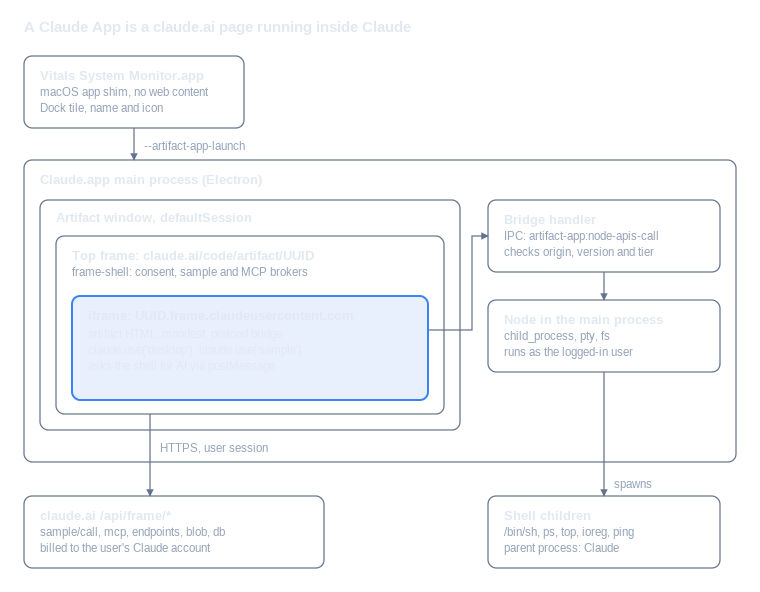
The top frame is Anthropic’s frame-shell, served from claude.ai. It loads the artifact’s HTML into an iframe on a per-artifact origin, <uuid>.frame.claudeusercontent.com, and brokers every capability the page can ask for: desktop, sample, mcp, db, files, endpoints, permissions and more.
The app’s code is fetched from claude.ai when the window loads; the bundle holds none of it, and a new artifact version reaches users on the next load. The view runs with sandbox: true, contextIsolation: true, nodeIntegration: false and DevTools off. nodeIntegrationInSubFrames: true is set only so the preload also runs in the iframe; the page itself gets no Node.
The desktop bridge and its three tiers
The native powers come from a preload script attached to the artifact window. It exposes one object to the artifact iframe only, never to the claude.ai shell, and the artifact reaches it with await window.claude.use('desktop'). Every call is one IPC message, artifact-app:node-apis-call. The main process rejects it with EPERM unless it comes from that same iframe, on the expected origin, at the expected artifact version. Each method belongs to a tier:
| Tier | Permission | Methods |
|---|---|---|
| 1 | none | window.*, Menu, Dock icon and badge, os.platform, os.arch, install, permissions |
| 2 | notifications | notification.show |
| 2 | shortcuts | globalShortcut.register |
| 2 | overlay | window.setIgnoreMouseEvents, setVisibleOnAllWorkspaces, screen.* |
| 2 | menu-bar | tray.set |
| 3 | full-access | fs.* (read, write, rm, rename…), os.info, shell.openPath / trashItem, childProcess.exec / spawn, pty.spawn |
An artifact declares what it wants in its own HTML:
<script id="claude-artifacts-manifest" type="application/json">
  {"permissions": ["full-access", "menu-bar", "overlay"]}
</script>
Claude asks the user, and the answers persist in Claude’s profile folder (on macOS ~/Library/Application Support/Claude/artifact-app-permissions.json), keyed by account, organization, artifact and permission, together with the artifact version that was approved.
Tier 3 is not a sandbox. childProcess and pty run in Claude’s main process through Node’s child_process and a PTY, as the logged-in user, with Claude’s environment. On either OS, Claude is the parent of every command the app runs.
Case study: what Vitals does with a shell
Vitals declares full-access, menu-bar and overlay, and its landing page is honest about it: “Needs full access, because it runs built-in macOS commands to read these figures.” The source matches the claim. It batches read-only commands into a single /bin/sh run, each on its own cadence:
| Command | Every (panel open / closed) |
|---|---|
vm_stat | each sample / 20 s |
netstat -ibn | each sample / 30 s |
ioreg -r -c IOBlockStorageDriver | each sample / 30 s |
ioreg -r -n AppleSmartBattery | 4 s / 60 s |
ioreg -r -d 1 -c IOAccelerator | 4 s / 60 s |
sysctl -n kern.memorystatus_vm_pressure_level vm.swapusage kern.boottime | 6 s / 20 s |
notifyutil -g com.apple.system.thermalpressurelevel | 10 s / 20 s |
pmset -g batt | 20 s / 60 s |
df -k /System/Volumes/Data | 60 s / 600 s |
On top of that it runs ps at most every 8 seconds, streams top through a child process and falls back to a PTY when top stays silent on a pipe, and pings the router and 1.1.1.1 for its network details. The Windows build of the same file does all of this through PowerShell.
Nothing here is malicious. But it shows the shape of the grant: a public web page, authored outside the installing organization, polls the shell every 10 seconds for as long as the app runs. The same grant would let a different page read ~/.ssh or run curl; the permission model has no finer granularity than “full access”.
How a Claude App talks to the model
A Claude App holds no API key and never calls api.anthropic.com. It asks the frame-shell, and the frame-shell calls claude.ai under the user’s own Claude account.
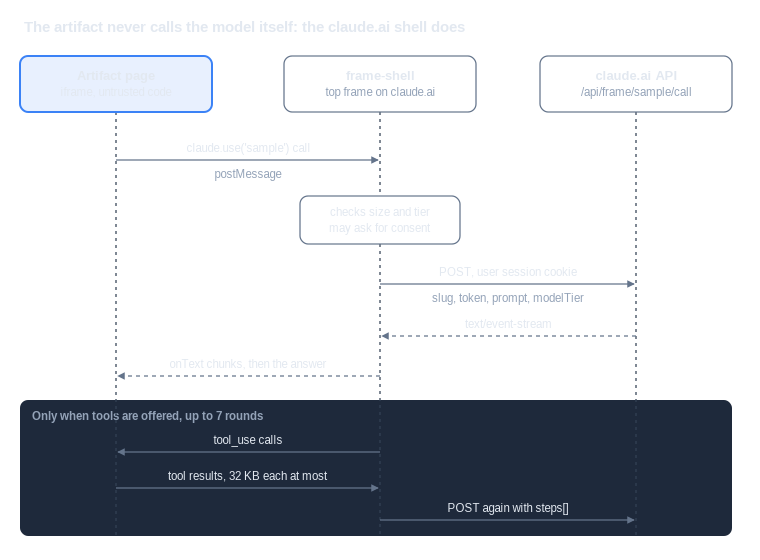
Vitals makes exactly one kind of model call, from its “Ask Claude” button:
sample = await window.claude.use('sample');
const r = await sample(prompt, { signal, modelTier: 'quick', onText });
The frame-shell validates the call before anything leaves the machine: a non-empty prompt or turn list of at most 256 KiB, a modelTier of default, complex, quick or inherit, and optional model, effort, images, format and tools. Then it checks consent, which may show the user a prompt. The request itself is a same-origin fetch:
POST https://claude.ai/api/frame/sample/call?org=<org uuid>
Content-Type: application/json
Accept: text/event-stream, application/json

{"slug":"<artifact>","token":"<capability token>",
 "prompt":"...","modelTier":"quick",
 "steps":[{"assistant":...,"results":[...]}]}
slug names the artifact, and token is a capability token the shell holds for it. The answer streams back as text/event-stream, or arrives as JSON. When the artifact offers tools, the shell forwards each tool call to the page, waits for the results (32 KB each at most) and posts again; a call is cut off after 7 rounds. Model calls are one of several claude.ai routes the shell uses for an artifact, all under /api/frame/ and the same session: mcp for the user’s connectors, endpoints for connected data, db for the artifact’s shared database, and blob and files for stored files.
Security model: what is enforced where
The design is careful. Each boundary below is enforced in code we could read, not by convention:
- Origin pinning. IPC from the shell page is accepted only from a top frame on
claude.ai; bridge calls only from the artifact iframe directly under it. - Navigation fences. The window cannot leave its artifact: other navigations open externally, redirects away are blocked, and repeated escapes blank the page.
- Version binding. A call from an iframe whose artifact version differs from the one loaded is refused, so a page cannot swap itself under an existing grant.
- Organization gate. Full access is allowed only for an artifact of the user’s own organization that nobody outside it has written in, and only when the organization allows it at all.
- Consent on the model path. Model calls pass a per-artifact consent check.
What the design does not do is scope tier 3. full-access is one switch for the whole filesystem and arbitrary processes, consent is per user, and the grant store is a plain JSON file in the user’s profile. For defenders, the important split is which layer sees what:
| Activity | Where it happens | Network inspection | Endpoint telemetry |
|---|---|---|---|
| Model calls | claude.ai shell → /api/frame/sample/call | Yes, if TLS to claude.ai is inspected | As traffic from Claude’s network helper |
| MCP, connected data, uploads | /api/frame/mcp, /endpoints, /blob | Yes, same | Same |
| Shell commands | Claude main process → shell children | Only their own network traffic | Yes: process lineage under Claude |
| File reads and writes | Claude main process via Node fs | No | Yes, as Claude |
| Installed apps and grants | artifact-apps-installed.json, artifact-app-permissions.json | No | Yes, by reading the files |
Watching a Claude App on the endpoint
To see this from the defender’s side, we built a small Claude App of our own, Workspace Check, and ran it on a Mac with the Netzilo Client and AIDR (AI Detection and Response) enabled. Everything shown below, the activity and the graph, was captured by that client. The app asks for full-access and, on one click, runs a handful of read-only commands, a DNS lookup, an HTTPS request to GitHub and a ping, counts the lines of ~/.gitconfig, and asks Claude to summarize the figures. It changes nothing on the machine.
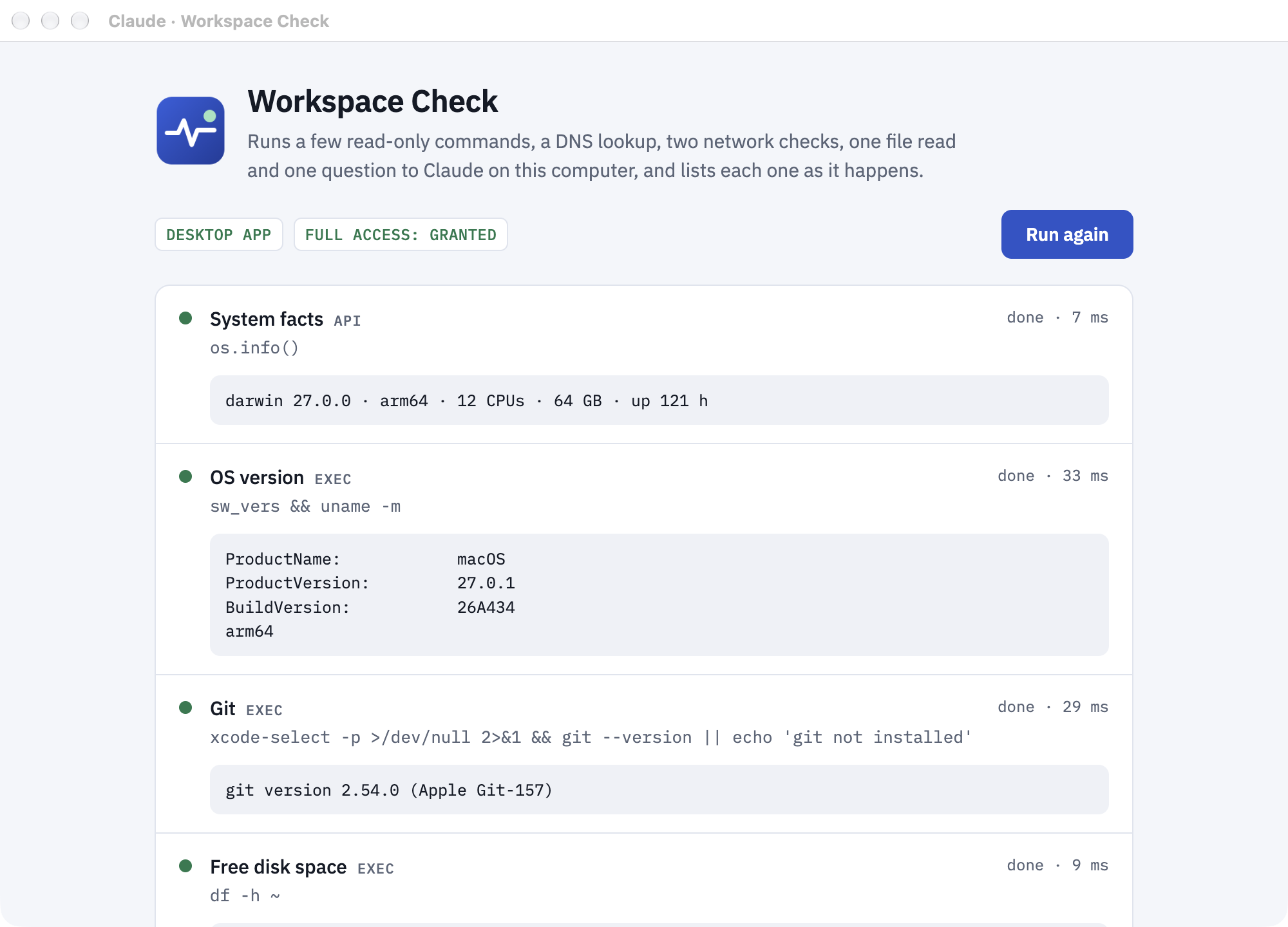
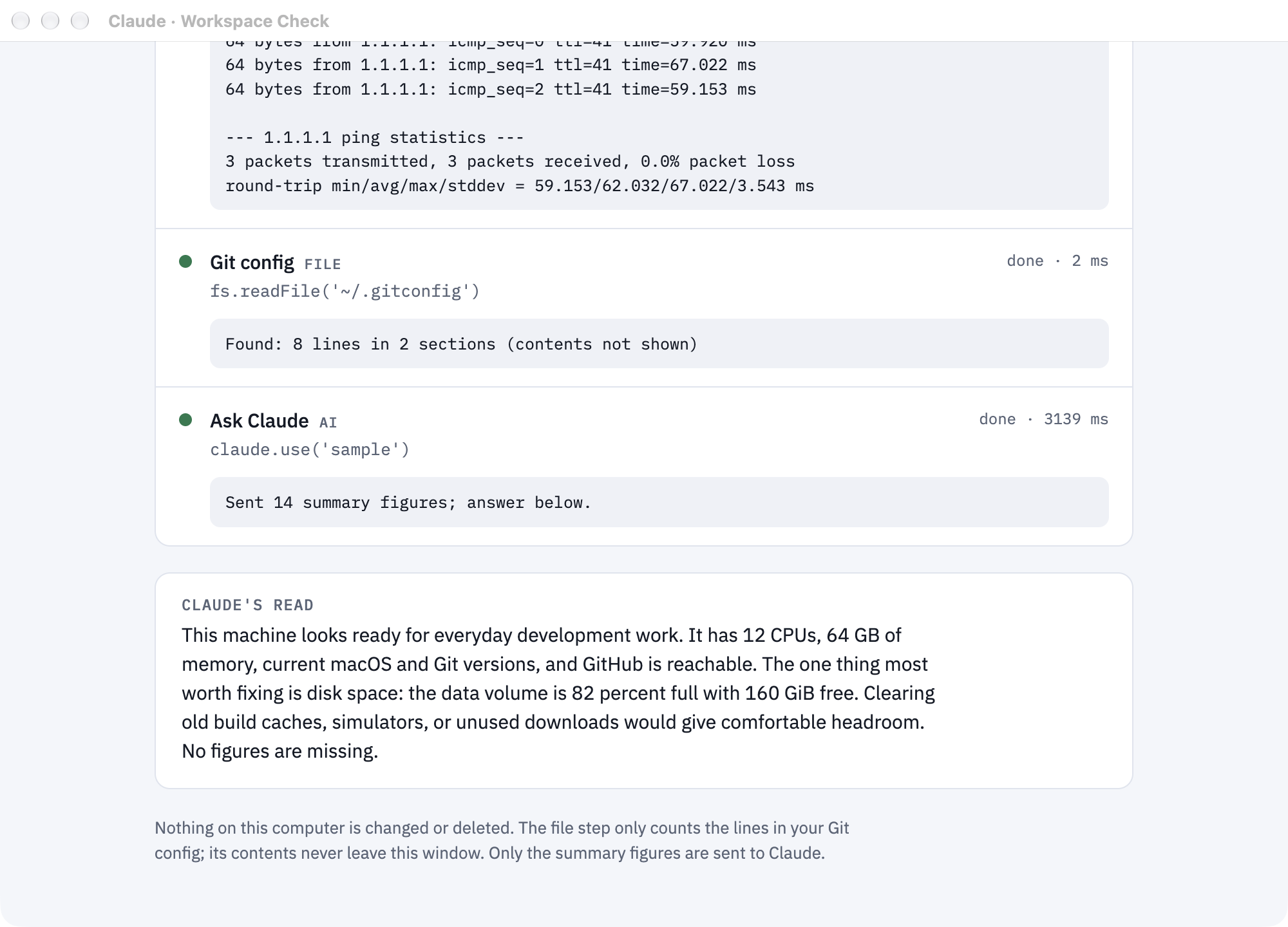
Full access needs the organization setting Full access to the computer under Organization settings › Artifacts, which is off by default on Team and Enterprise plans. While it is off, every full-access call fails with ENOSYS: Your organization doesn't allow full access for apps.
The Netzilo Client, with AIDR enabled, captures the run on the Mac as a process tree under Claude’s main process. Every command the app asked for enters through Claude’s disclaimer wrapper, started with --pgroup; Claude’s own housekeeping commands use the same wrapper without that flag. The model call leaves from a different process, the Chromium network helper.
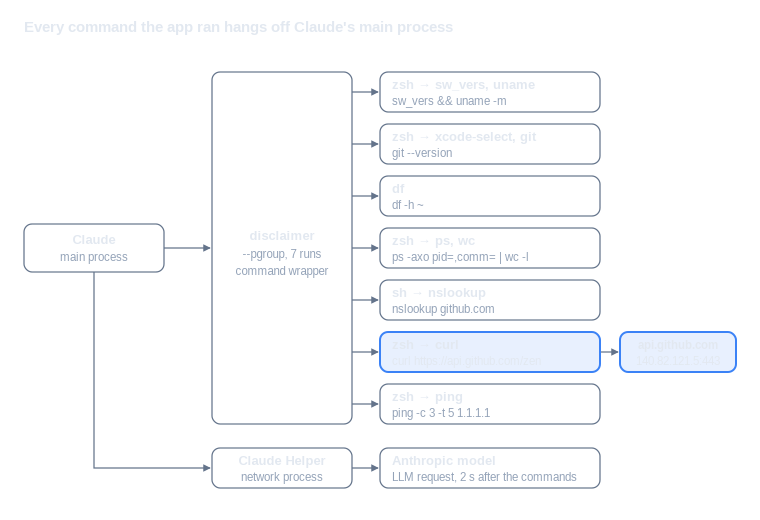
The seven commands ran within the same second; curl was the only one that opened a TCP connection, to api.github.com, and the model call followed from the network helper two seconds later. Nothing in a command line names the app that asked for it: the link between the commands and the AI call is the process tree and the time between them. This is the same run in the Netzilo dashboard: the behavior graph built from what the Netzilo Client captured with AIDR enabled, drawn for the AI session:
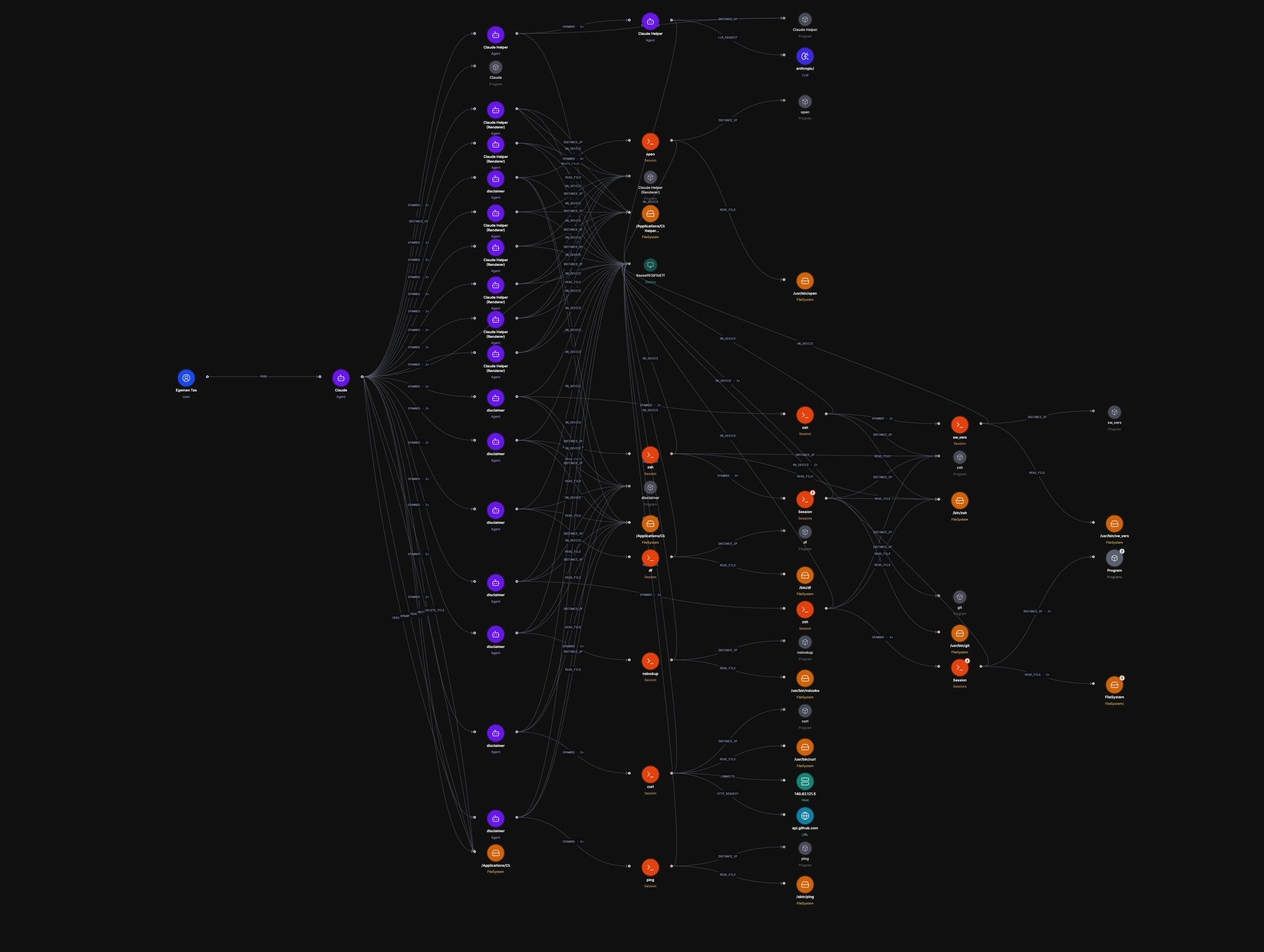
Reading left to right: the user runs Claude; Claude’s renderers, network helpers and disclaimer wrappers sit one step out; under each wrapper the command it ran, each with the program it executed; and at the far edges what left the machine, curl to api.github.com and the network helper’s request to the model.
The bottom line
A Claude App is three things stacked: a Chromium app shim for identity, a claude.ai page for code and AI, and a preload bridge for native power. Its AI use runs entirely through claude.ai and the user’s own Claude account, with no API key on the device. Its local power, when granted, is the full power of the user.
That makes two questions for security teams. The AI channel is ordinary HTTPS to claude.ai: it can be inspected, tied to the artifact that made it, and governed like any other model traffic. The tier-3 shell is local and needs the endpoint: process lineage under Claude, and an inventory of installed apps and their grants.
The Netzilo Client with AIDR enabled captures both: the app’s model calls and the commands it runs, in one behavior graph.
Method
- Claude Desktop 7.37095.0 on macOS (Apple silicon), analysed on November 27, 2026. Windows was not examined directly; what we say about it comes from the artifact’s own Windows code path and the platform-neutral code in Claude’s archives.
- Claude’s application archives extracted with
@electron/asar; the bundle inspected withcodesign,plutilandstrings; on-disk state read from Claude’s profile folder. The artifact source was treated as untrusted data throughout. - File and chunk names are build-specific and will change between releases; the IPC channel names, endpoint paths and store file names are the stable handles to search for.
Sources
See your Claude Apps in Netzilo
See every Claude App on your devices: the commands it runs, where it connects and what it asks the model, in one behavior graph.